> ## Documentation Index
> Fetch the complete documentation index at: https://docs.penbox.io/llms.txt
> Use this file to discover all available pages before exploring further.
# Product updates February, 2026
# Granular Data Retention & Deletion Audit Log
**Data governance has always been at the center of Penbox.** We've taken a major step forward with two new capabilities.
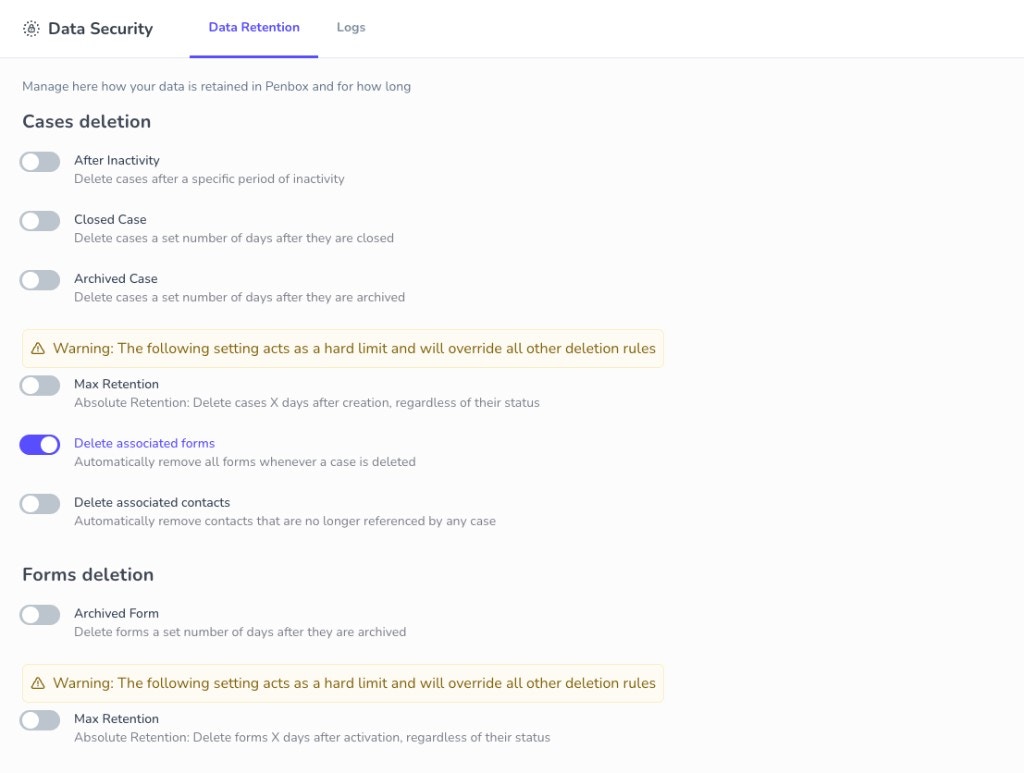
## Granular Data Retention & Lifecycle Settings
You can now define **granular data retention and lifecycle settings** for both cases and forms, including cascade options for associated forms and contacts. For example, delete cases after 90 days of inactivity, remove closed cases 30 days after closure, or set a hard cap regardless of status.
 ## Data Deletion Audit Log
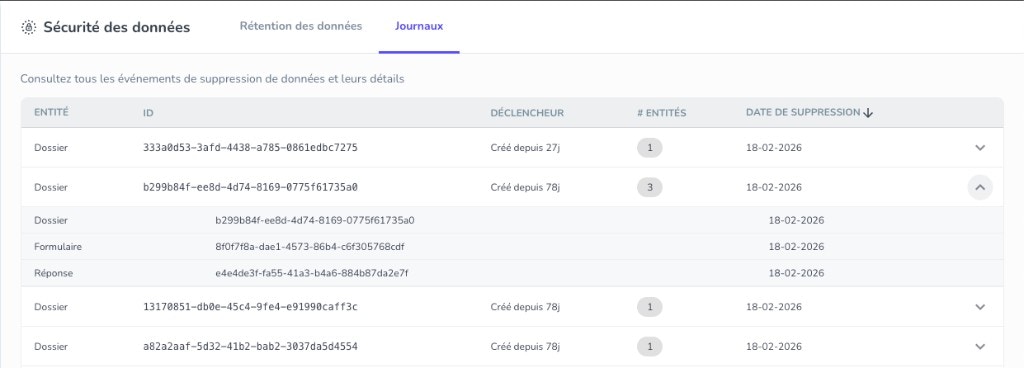
Administrators get a **detailed data deletion audit log** that shows exactly what was deleted from Penbox, when, and which rule triggered it—so you can demonstrate compliance and trace any data removal.
## Data Deletion Audit Log
Administrators get a **detailed data deletion audit log** that shows exactly what was deleted from Penbox, when, and which rule triggered it—so you can demonstrate compliance and trace any data removal.
 [Data Security documentation →](/workspace/settings/data-security)
# Document Intelligence API: Extract Data from Any Document
Penbox Document Intelligence is now available directly from Connect API. Extract structured data from invoices, ID cards, contracts, and forms—all in one API call. Built for real-time workflows, it delivers frontier results with fast processing tailored to the administrative documents your users deal with every day.
## What's New
### Direct API Access
**Document Intelligence is now in your API.**
Send document images or PDFs to `POST /document_intelligence`, define the fields you want to extract, and get back structured JSON—no separate setup or integration required. Perfect for automating invoice processing, onboarding flows, compliance checks, or any workflow that starts with a document.
The engine is fast, built for real-time use, and tuned for the kinds of documents Penbox users typically process: administrative forms, invoices, bank statements, ID documents, and contracts.
[Create Document Intelligence →](/api-reference/document-intelligence/create-document-intelligence)
### List Field Type
**Extract repeating items—invoice lines, table rows, or complex lists.**
You can now define fields with `type: "list"` to extract structured arrays from documents. Each item in the list can have its own sub-fields (product, quantity, price, etc.), so you get fully typed invoice line items, table rows, or any repeating structure—not just flat text.
Use `fields` to define the structure of each item, and the API returns an array of objects with extracted values per item. Empty lists return `[]`; missing regular fields return `null`.
### Validation & Confidence
**Know how reliable each extraction is.**
Every extracted field now includes a `confidence` level (`high`, `medium`, or `low`), so you can decide when to auto-approve or flag for review. The response also includes a `validation` object with:
* **`is_valid`** – Whether the document passes your validation rules
* **`user_explanation`** – A human-readable explanation in your chosen language
* **`is_blurry`** – Whether image quality may affect readability
Use this to route low-confidence extractions or blurry documents to human review automatically.
[Learn more in the API Reference →](/api-reference/document-intelligence/create-document-intelligence)
[Data Security documentation →](/workspace/settings/data-security)
# Document Intelligence API: Extract Data from Any Document
Penbox Document Intelligence is now available directly from Connect API. Extract structured data from invoices, ID cards, contracts, and forms—all in one API call. Built for real-time workflows, it delivers frontier results with fast processing tailored to the administrative documents your users deal with every day.
## What's New
### Direct API Access
**Document Intelligence is now in your API.**
Send document images or PDFs to `POST /document_intelligence`, define the fields you want to extract, and get back structured JSON—no separate setup or integration required. Perfect for automating invoice processing, onboarding flows, compliance checks, or any workflow that starts with a document.
The engine is fast, built for real-time use, and tuned for the kinds of documents Penbox users typically process: administrative forms, invoices, bank statements, ID documents, and contracts.
[Create Document Intelligence →](/api-reference/document-intelligence/create-document-intelligence)
### List Field Type
**Extract repeating items—invoice lines, table rows, or complex lists.**
You can now define fields with `type: "list"` to extract structured arrays from documents. Each item in the list can have its own sub-fields (product, quantity, price, etc.), so you get fully typed invoice line items, table rows, or any repeating structure—not just flat text.
Use `fields` to define the structure of each item, and the API returns an array of objects with extracted values per item. Empty lists return `[]`; missing regular fields return `null`.
### Validation & Confidence
**Know how reliable each extraction is.**
Every extracted field now includes a `confidence` level (`high`, `medium`, or `low`), so you can decide when to auto-approve or flag for review. The response also includes a `validation` object with:
* **`is_valid`** – Whether the document passes your validation rules
* **`user_explanation`** – A human-readable explanation in your chosen language
* **`is_blurry`** – Whether image quality may affect readability
Use this to route low-confidence extractions or blurry documents to human review automatically.
[Learn more in the API Reference →](/api-reference/document-intelligence/create-document-intelligence)