> ## Documentation Index
> Fetch the complete documentation index at: https://docs.penbox.io/llms.txt
> Use this file to discover all available pages before exploring further.
# Data Security
> Data retention and lifecycle settings, deletion audit logs
Data Security settings control how long your data is retained in Penbox and provide a complete audit trail of all deletions. Access them from **Settings → Data Security** in the app.
 ## Data Retention Settings
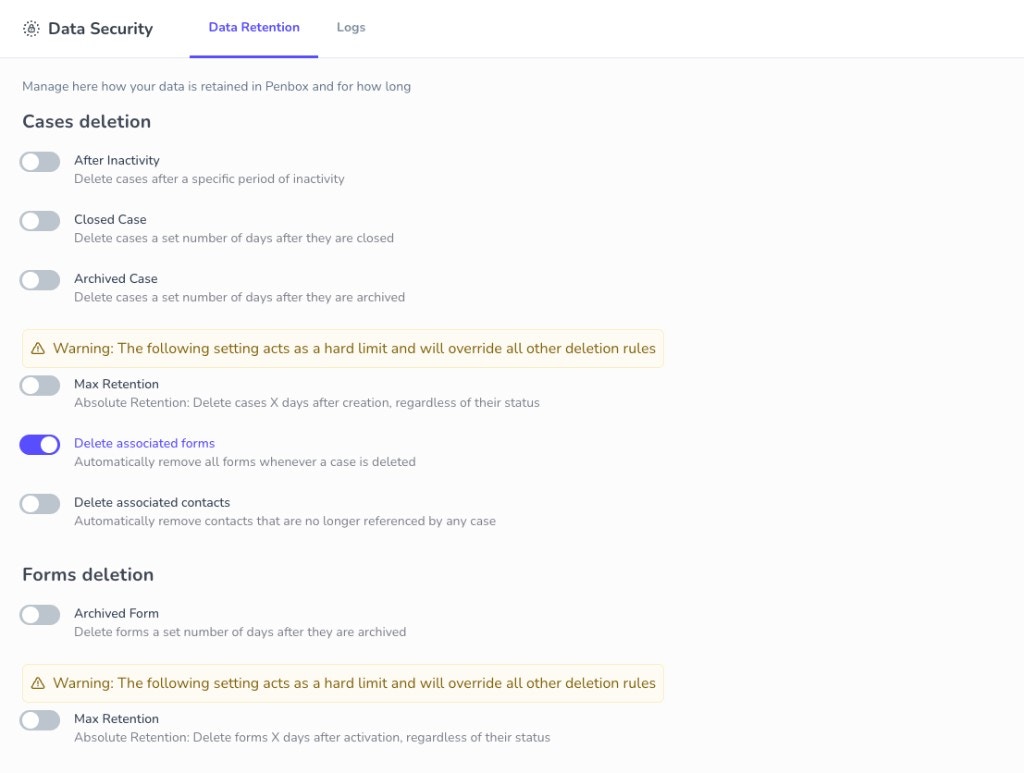
You can define **granular data retention and lifecycle settings** for both cases and forms. Each rule can be enabled independently and configured with a retention period in days.
### Cases Deletion
| Rule | Description |
| -------------------- | ---------------------------------------------------------------------------------------------------- |
| **After Inactivity** | Delete cases after a specific period of inactivity |
| **Closed Case** | Delete cases X days after they are closed |
| **Archived Case** | Delete cases X days after they are archived |
| **Max Retention** | Absolute limit: delete cases X days after creation, regardless of status. Overrides all other rules. |
### Forms Deletion
| Rule | Description |
| ----------------- | ------------------------------------------------------------------------------------------------------ |
| **Archived Form** | Delete forms X days after they are archived |
| **Max Retention** | Absolute limit: delete forms X days after activation, regardless of status. Overrides all other rules. |
### Cascade Options
When a case is deleted, you can optionally:
* **Delete associated forms** — Automatically remove all forms linked to the case
* **Delete associated contacts** — Remove contacts that are no longer referenced by any case
**Max Retention** acts as a hard limit and overrides all other deletion rules. Use it carefully.
## Data Deletion Audit Log
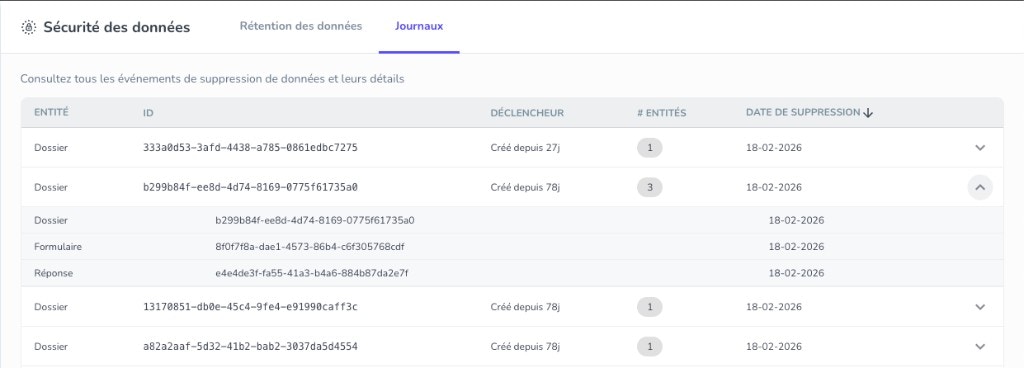
The **Logs** tab in Data Security shows every deletion event with full traceability:
* **What** was deleted (cases, forms, attachments, contacts)
* **When** it was deleted
* **Which rule** triggered it (inactivity, closed, archived, max retention)
* **How many entities** were affected (including cascaded deletions)
Use the audit log for compliance reviews, internal audits, and understanding exactly how retention rules are applied across your workspace.
## Data Retention Settings
You can define **granular data retention and lifecycle settings** for both cases and forms. Each rule can be enabled independently and configured with a retention period in days.
### Cases Deletion
| Rule | Description |
| -------------------- | ---------------------------------------------------------------------------------------------------- |
| **After Inactivity** | Delete cases after a specific period of inactivity |
| **Closed Case** | Delete cases X days after they are closed |
| **Archived Case** | Delete cases X days after they are archived |
| **Max Retention** | Absolute limit: delete cases X days after creation, regardless of status. Overrides all other rules. |
### Forms Deletion
| Rule | Description |
| ----------------- | ------------------------------------------------------------------------------------------------------ |
| **Archived Form** | Delete forms X days after they are archived |
| **Max Retention** | Absolute limit: delete forms X days after activation, regardless of status. Overrides all other rules. |
### Cascade Options
When a case is deleted, you can optionally:
* **Delete associated forms** — Automatically remove all forms linked to the case
* **Delete associated contacts** — Remove contacts that are no longer referenced by any case
**Max Retention** acts as a hard limit and overrides all other deletion rules. Use it carefully.
## Data Deletion Audit Log
The **Logs** tab in Data Security shows every deletion event with full traceability:
* **What** was deleted (cases, forms, attachments, contacts)
* **When** it was deleted
* **Which rule** triggered it (inactivity, closed, archived, max retention)
* **How many entities** were affected (including cascaded deletions)
Use the audit log for compliance reviews, internal audits, and understanding exactly how retention rules are applied across your workspace.